conky 命令详解
|
选择喜欢的代码风格
A B C D E F G H I J K L M N O P Q R S T U V W X Y Z
Conky 是 Linux 下的免费、轻量级系统监视器,可在您的桌面上显示任何类型的信息。

conky 命令安装:
-bash/zsh: conky command not found

#Debian
apt-get install conky-cli

#Ubuntu
apt-get install conky-cli

#Alpine
apk add conky

#Arch Linux
pacman -S conky

# query aur database
$ yay -Ss conky

#CentOS
yum install epel-release.noarch -y 之后:
yum install conky

#Kali Linux
apt-get install conky-cli

#Fedora
dnf install conky

#Raspbian
apt-get install conky-cli

#FreeBSD
#Conky is in ports in `sysutils/conky`.
$ cd /usr/ports/sysutils/conky
$ make install clean

#Alternatively, install the binary package.
$ pkg install conky


#Gentoo Linux
emerge conky


#NixOS
nix-env -i conky

#Docker
docker run cmd.cat/conky conky
conky 命令补充说明:
Conky 可以显示 300 多个内置对象,包括对以下内容的支持:

- 大量的 OS 统计信息(uname、正常运行时间、CPU 使用率、mem 使用率、磁盘使用率、“顶级”(如进程统计信息)和网络监控,仅举几例)。
- 内置的 IMAP 和 POP3 支持。
- 内置对许多流行音乐播放器(MPD、XMMS2、Audacious)的支持。
- 可以使用内置的Lua支持或任何您自己的脚本和程序(更多内容)进行扩展。
- 内置的 Imlib2 和 Cairo 绑定,用于使用 Lua 进行任意绘制(更多内容)。
- 在 Linux、FreeBSD、OpenBSD、DragonFlyBSD、NetBSD、Solaris、Haiku 和 macOS 上运行!
- 适用于 amd64、armv7 和 aarch64(aka armv8)的 Docker 映像
Conky 可以将信息显示为文本,也可以使用简单的进度条和图形小部件(具有不同的字体和颜色)显示信息。
conky 命令截图:
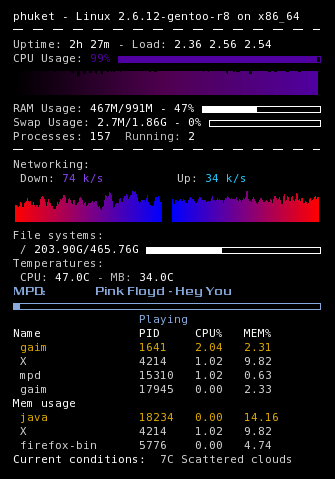
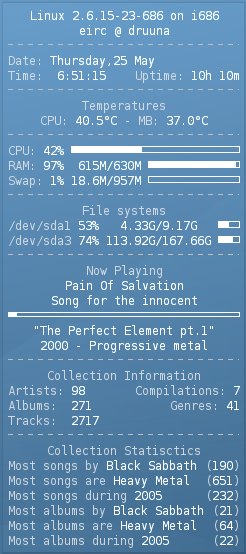
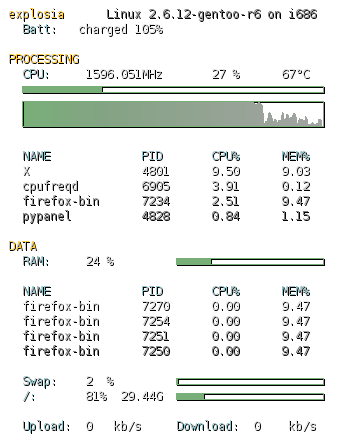
conky 命令语法:
conky [ options ]
conky 命令选项:
-v | -V | --version
Prints version and exits

-q | --quiet
Run Conky in 'quiet mode' (ie. no output)

-D | --debug
Increase debugging output, ie. -DD for more debugging

-a | --alignment= ALIGNMENT
Text alignment on screen, {top,bottom,middle}_{left,right,middle} or none. Can also be abbreviated with first chars of position, ie. tr for top_right.

-b | --double-buffer
Use double buffering (eliminates "flicker")

-c | --config= FILE
Config file to load instead of $HOME/.conkyrc

-C | --print-config
Print builtin default config to stdout. See also the section EXAMPLES for more information.

-d | --daemonize
Daemonize Conky, aka fork to background

-f | --font= FONT
Font to use

-h | --help
Prints command line help and exits

-o | --own-window
Create own window to draw

-t | --text= TEXT
Text to render, remember single quotes, like -t ' $uptime '

-p | --pause= SECONDS
Time to pause before actually starting Conky

-u | --interval= SECONDS
Update interval

-w | --window-id= WIN_ID
Window id to draw

-X | --display= DISPLAY
X11 display to use

-x X_COORDINATE
X position

-y Y_COORDINATE
Y position

-i COUNT
Number of times to update Conky (and quit)
conky 命令实例:
conky 使用默认的内置配置启动:
conky
conky 创建一个新的默认配置:
conky -C > ~/.conkyrc
conky 使用给定的配置文件启动 conky:
conky -c path/to/config
conky 从后台启动(守护进程):
conky -d
在桌面上对齐 conky:
conky -a {top,bottom,middle}_{left,right,middle}
conky 启动前在启动时暂停 5 秒钟:
conky -p 5
conky 命令扩展阅读:
- brndnmtthws / conky: Light-weight system monitor for X
- pidstat 命令
- iostat 命令
- dstat 命令
- vmstat 命令
- mpstat 命令
- dstat 命令
- systemd-analyze 命令
- conky 命令
- nethogs 命令
CommandNotFound ⚡️ 坑否 - 其他频道扩展阅读:
conky 命令评论
其他
-
ruby 命令
abc2abc 命令
bat 命令
bison 命令
calc 命令
cc 命令
cdrecord 命令
coffee 命令
conky 命令
convertquota 命令
cpio 命令
cq、boto、boto3 命令
csc 命令
csvlook 命令
cupsdisable 命令
cupsenable 命令
db_load 命令
declare 命令
dos2unix 命令
eject 命令
enable 命令
erl 命令
exec 命令
false 命令
getfacl 命令
gifsicle 命令
gist 命令
godoc 命令
gofmt 命令
gource 命令
hash 命令
iex 命令
info 命令
insmod 命令
jmap 命令
json5 命令
ld 命令
ldd 命令
let 命令
lldb 命令
losetup 命令
lp 命令
lpr 命令
lsmod 命令
m4 命令
minetestserver 命令
mix 命令
mkfs 命令
nroff 命令
openssl 命令
opt 命令
pagesize 命令
php 命令
phpize 命令
phploc 命令
phpunit 命令
pr 命令
psppire 命令
pv 命令
python 命令
q 命令
rdesktop 命令
rlogin 命令
rofi 命令
rustc 命令
rustfmt 命令
salt 命令
seq 命令
setfacl 命令
showkey 命令
sleep 命令
startx 命令
swapoff 命令
swapon 命令
tabs 命令
tac 命令
test 命令
tokei 命令
tox 命令
trap 命令
troff 命令
true 命令
ul 命令
unix2dos 命令
upx 命令
whatis 命令
xhost 命令
yes 命令
z 命令
共收录到 552 个 Linux 命令